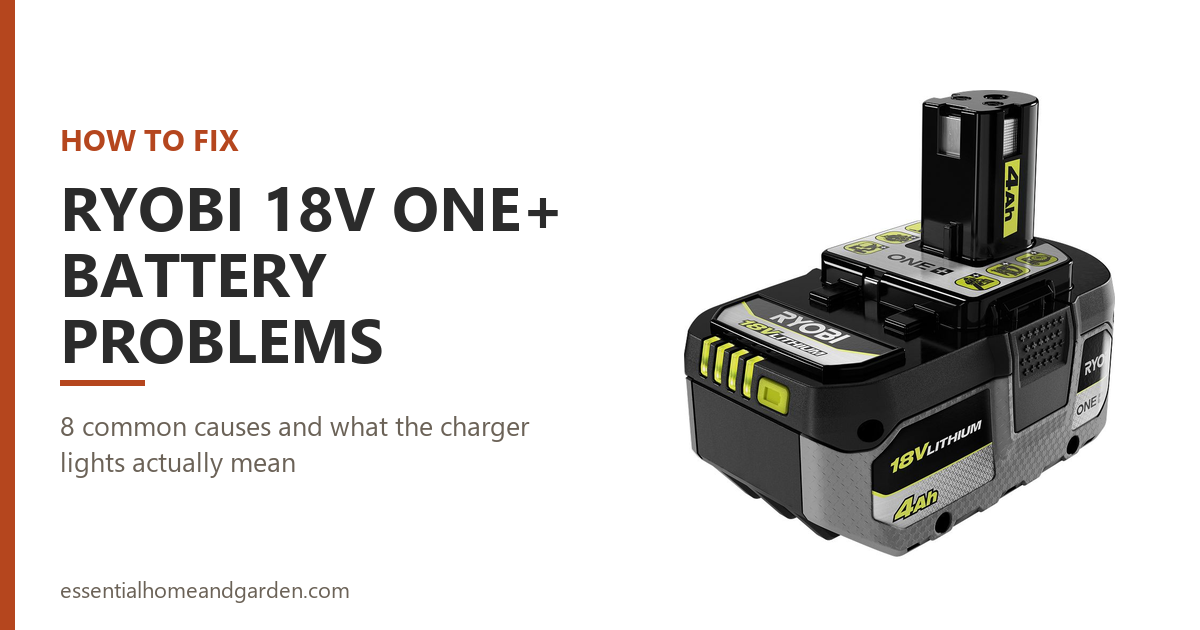
Your Ryobi 18V ONE+ battery has stopped doing its job, and the lights on the charger are not telling you much. In most cases your pack is fine and the fix takes seconds, because the most common 18V fault is a protection circuit doing exactly what it was built to do.
The 18V ONE+ system is Ryobi’s biggest platform, so there’s a good chance you own several packs and one charger. That also means one bad charger can make three of your healthy batteries look dead.
This guide covers the current PBP-series packs and the older P-series ones you probably still have in the drawer, along with the P117 charger and its replacements. Every light code and temperature figure here comes from Ryobi’s 18V manuals.
One thing to get straight before you start. 18V ONE+ parts and 40V parts are not the same thing, and readers mix them up constantly. If the label on your pack says 40V, this is the wrong page, and you want our Ryobi 40V battery guide instead.
This post contains affiliate links. We may be paid a commission if you purchase through links, at no extra cost to you.
The Important Stuff
- A tool that cuts out mid-job is usually not broken. Release the trigger and squeeze it again. That resets the pack’s protection circuit, and Ryobi documents it as the fix.
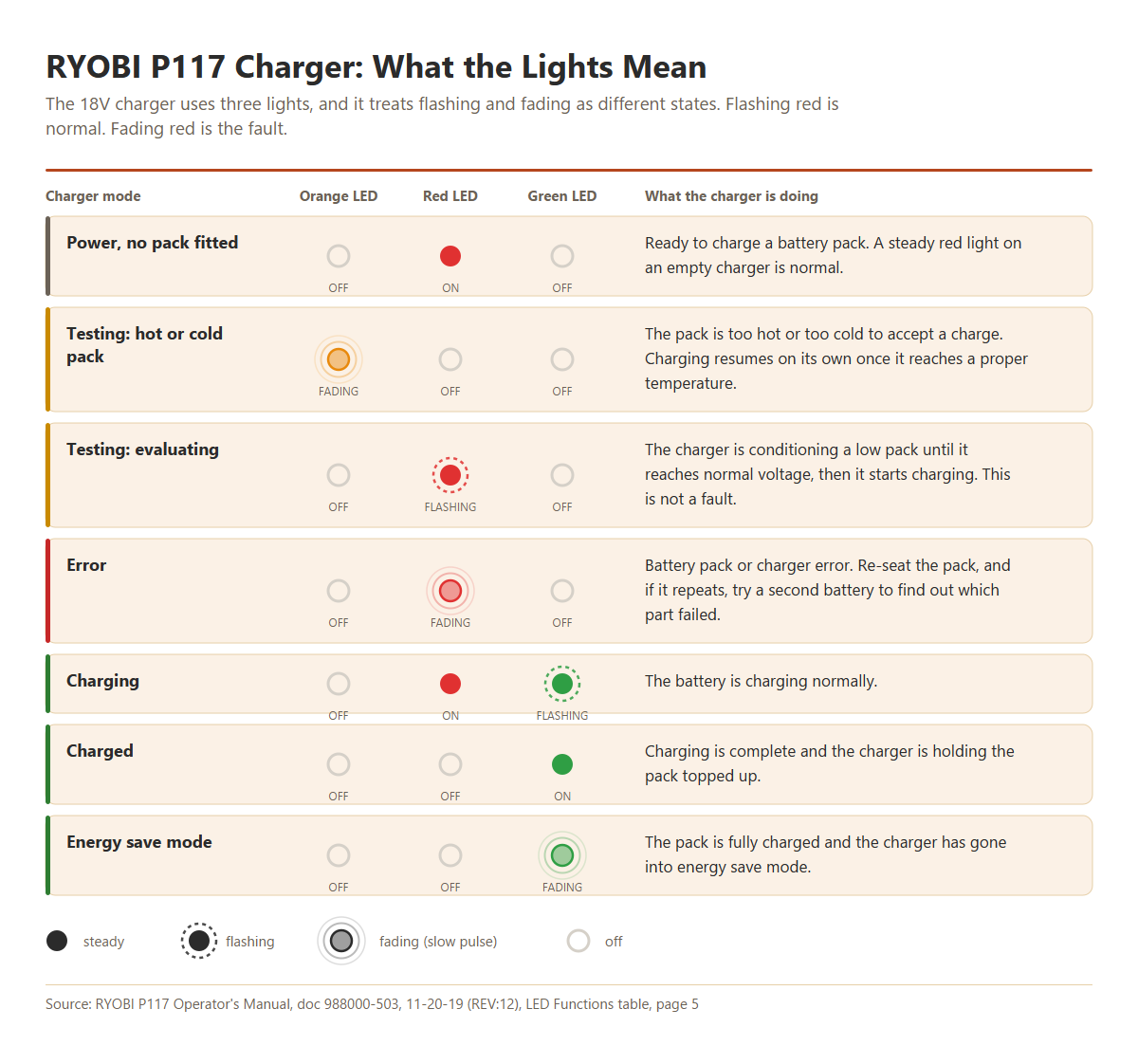
- Flashing red and fading red mean opposite things on an 18V charger. Flashing red is normal. Fading red is the fault. Plenty of advice online gets this backwards.
- Lithium packs do not fade as they empty. They run at full power and then stop. An abrupt cut-out is designed behavior, not a symptom.
- The 18V warranty is three years on the tool, not five. That’s a real difference from the 40V line, and it changes when a claim is worth making.
- Two 18V products were recalled. If you own a P108 pack or a P113 charger, check the numbers below before you use either again.
8 Reasons Why Your Ryobi 18V ONE+ Battery Is Not Working & How To Fix It
Use this table for a summary of what is going on. Read on for the detail on each one.
| # | Reason | Solution | Jump to fix |
|---|---|---|---|
| 1 | Tool stopped mid-job, pack still shows charge | Release the trigger to reset the protection circuit, then carry on | Fix |
| 2 | Charger red light fading in and out | Error state. Re-seat the pack, then test a second battery | Fix |
| 3 | Charger red light flashing on and off | Not a fault. The charger is evaluating a low pack | Fix |
| 4 | Charger orange light fading | Pack is too hot or too cold. Charging starts by itself | Fix |
| 5 | Fuel gauge reads full but the tool does nothing | Clean the contacts, then load-test the pack | Fix |
| 6 | Pack is flat every time you come back to it | Store at 30 to 50%, below 80F, and top up every six months | Fix |
| 7 | Charger shows no lights at all | Stop. Remove the pack and do not insert another one | Fix |
| 8 | Pack is genuinely worn out | Check the warranty date first, then replace it | Fix |
1. Your Tool Stopped Mid-Job and the Pack Still Shows Charge
You are halfway through a cut and the tool dies. You pull the trigger again and nothing happens, but the fuel gauge still shows two or three lights.
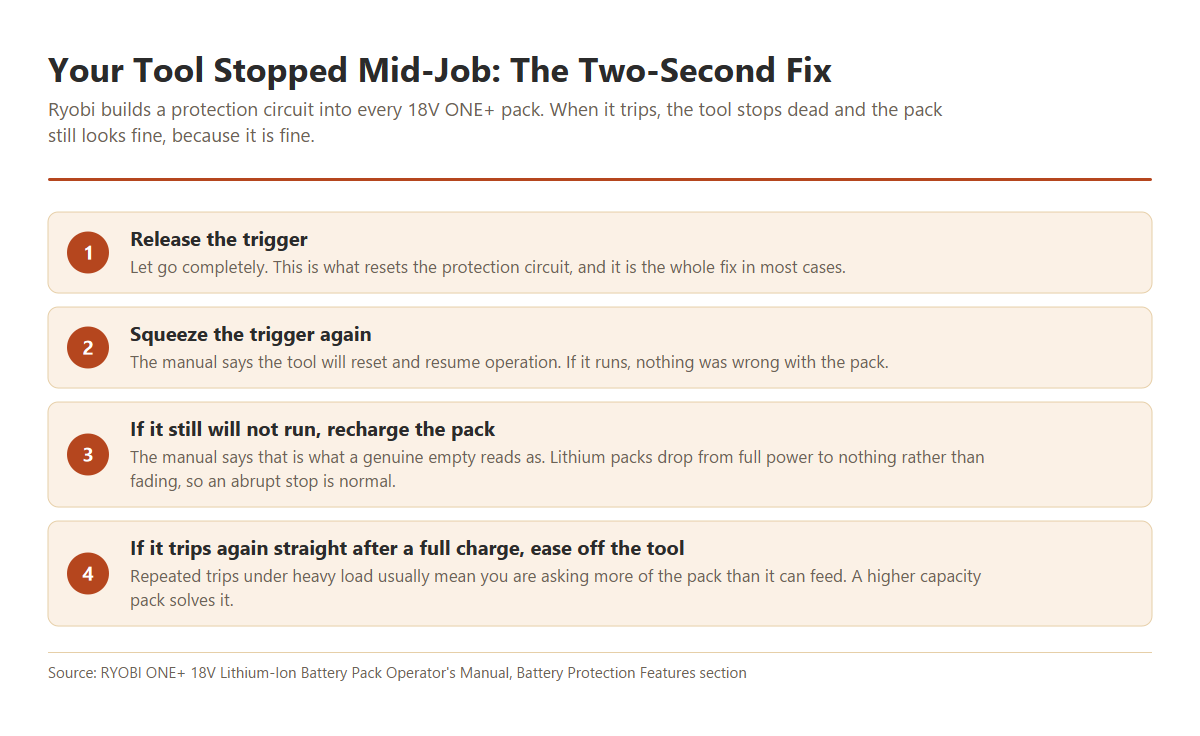
Every 18V ONE+ pack has a protection circuit built into it. Ryobi describes it as a set of features that protect the lithium cells and maximize battery life, and it trips when the tool draws more current than the pack wants to give.
When it trips, your tool stops instantly. The pack isn’t damaged and the charge is still in there.
How To Fix It
- Release the trigger completely. Letting go is what resets the circuit.
- Squeeze the trigger again. Ryobi’s wording is that the tool will reset and resume operation.
- If it still will not run, put the pack on the charger. The manual says that is what a genuinely empty pack reads as.
- If it trips again straight after a full charge, ease off. You are asking more of the pack than it can feed.
That last point is worth sitting with. A 1.5Ah compact pack in a circular saw will trip constantly, and there’s nothing wrong with either one. A higher capacity pack delivers more current and stops the problem.
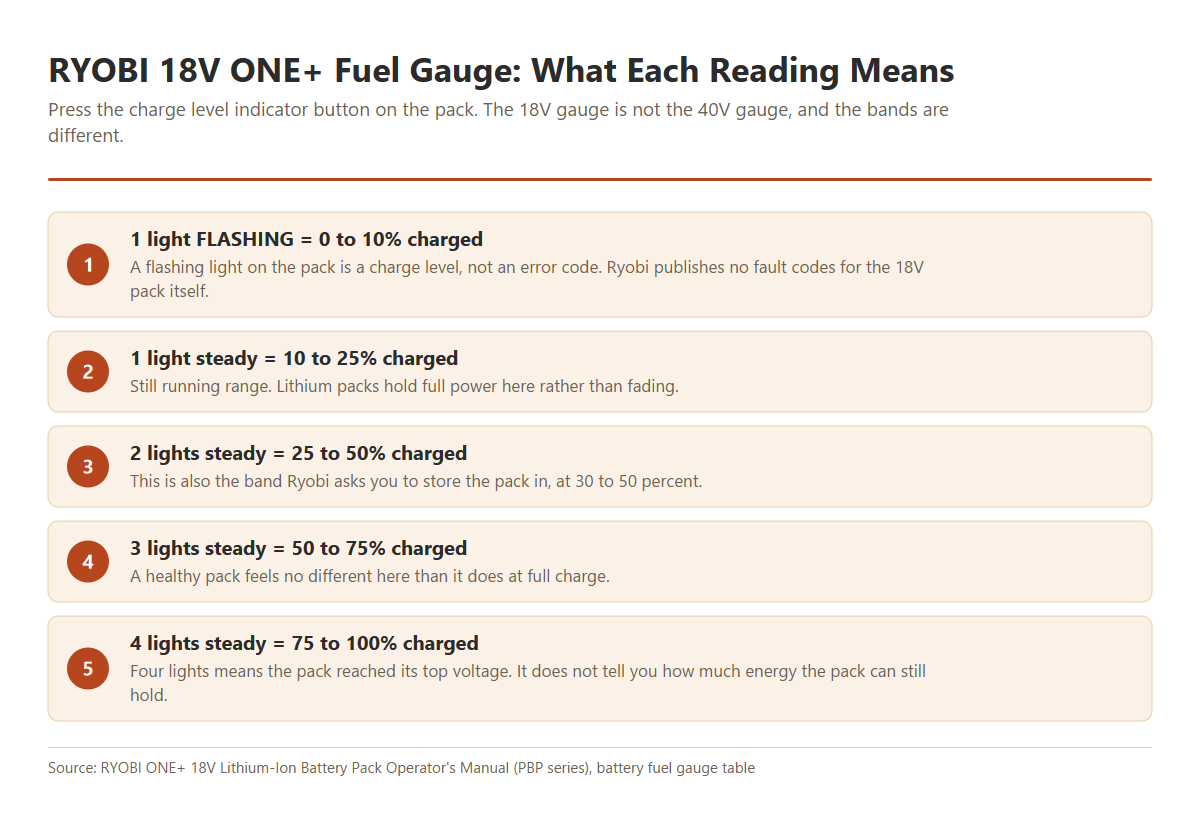
If your tool cuts out and the gauge shows one flashing light, that isn’t a fault code. It means your pack is between 0 and 10% charged and needs a recharge.
2. The Charger Shows a Fading Red Light
This is the one real fault state on an 18V charger, and Ryobi calls it Error. On the P117 it shows as the red light slowly fading in and out, with the orange and green lights off.
The important part is that your charger can’t tell you whether the pack or the charger itself is the problem. It only knows that something in the pair isn’t behaving.
Ryobi prints a procedure for separating the two, and it takes about five minutes with a second battery.
How To Fix It
- Pull the pack off the charger and slide it back on. Make sure the latches click home.
- Watch the lights again. If the Error clears, a poor seat or a dirty contact caused it.
- If Error repeats, put a different battery you know is good on the same charger.
- If the second battery charges normally, the first pack has failed.
- If the second battery also shows Error, the charger is the problem and Ryobi says it should be replaced.
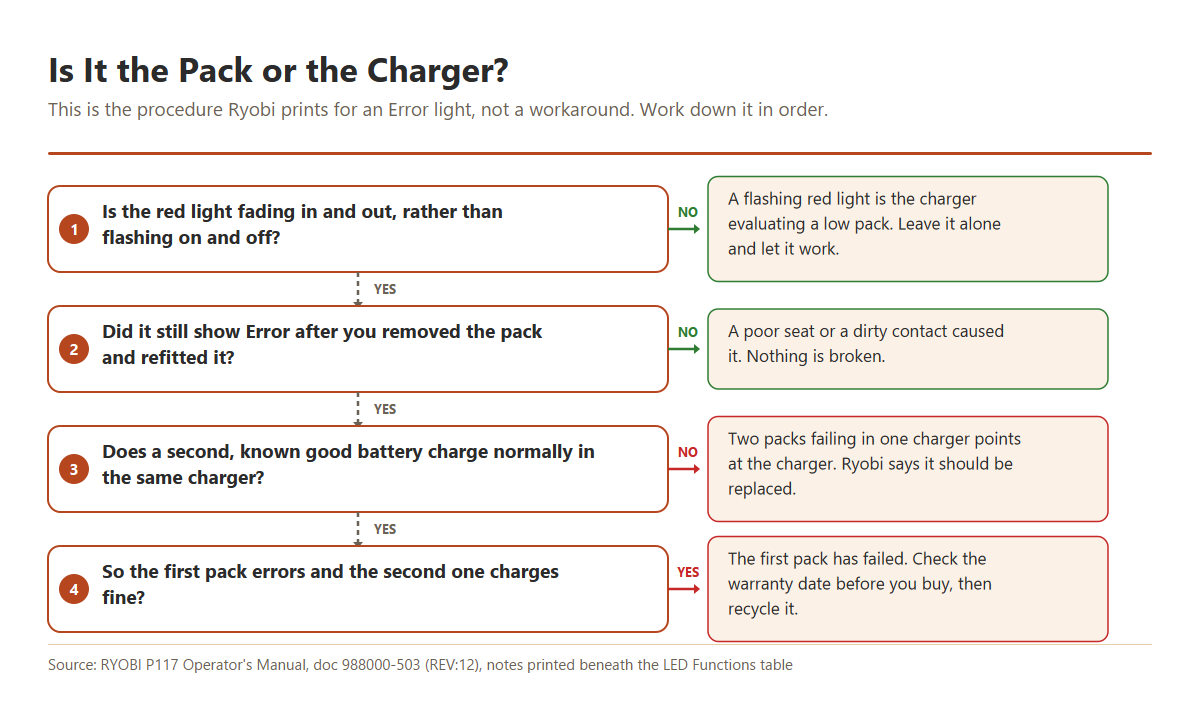
Don’t skip step 3. It’s the only step that actually answers the question, and it’s the difference between buying a battery you didn’t need and buying a charger you did.
Second battery charged fine, first one still errors?
Then the pack has failed rather than the charger. A genuine ONE+ battery drops into every 18V tool you already own.
3. The Charger Shows a Flashing Red Light
Here is the one that costs people money. A flashing red light on your 18V charger is not a fault, and it doesn’t mean your battery is defective.
Ryobi calls this mode Evaluating. The charger has found a pack sitting below its normal voltage, so it is feeding it a gentle conditioning current until the voltage comes up. Once it does, your charger switches into normal charge mode on its own.
Several of the most widely read pages on this problem say flashing red means a dead battery. That advice has people throwing away packs that were about to recover, and yours could be one of them.
The distinction you’re looking for is flashing versus fading. Flashing red blinks on and off cleanly. Fading red swells and dims like breathing. One is the charger working, the other is the charger giving up.
How To Fix It
- Leave the pack on the charger and let it run. Give it a good half hour.
- Watch for the red light to stop flashing and the green light to start flashing. That is normal charging beginning.
- Come back later and check for a steady green light, which means the charge is complete.
- If the light changes from flashing to fading instead, you now have an Error, and section 2 applies.
A full charge takes roughly 30 minutes on a P117, though that varies with the pack. A deeply flat pack spends part of that time in Evaluating before charging even starts, so it can take longer than you’d expect.
See current RYOBI 18V ONE+ chargers
4. The Charger Shows a Fading Orange Light
The orange light is the one the 40V chargers do not have, so this state surprises people who have moved across from that platform.
A fading orange light means the pack is too hot or too cold to charge safely. Your charger hasn’t rejected it. It’s holding the pack and waiting.
It happens most often when you pull a battery out of a tool you’ve been working hard and put it straight on the charger.
How To Fix It
- Leave the pack where it is. The charger begins charging by itself once the temperature comes back into range.
- If the pack is hot, give it 30 minutes somewhere shaded and airy before you expect anything.
- If the pack is cold, bring it indoors and let it warm to room temperature.
- Do not put a cold pack in front of a heater, and do not put a hot one in the fridge. Condensation inside a pack causes its own problems, and you’ll have traded one fault for another.
Ryobi does not publish a numeric charging temperature window for the 18V line, so treat any specific figures you find quoted as unverified. What the manual does say is that your charger works best at normal room temperature, and that a pack becoming slightly warm while charging is normal.
For running the tool rather than charging it, there is a published figure: an 18V ONE+ pack can be used down to 14F. Fit it, run the tool on something light for about a minute, and it warms up and behaves normally.
5. The Fuel Gauge Reads Full but the Tool Does Nothing
You press the charge level button, all four lights come on, and the tool is still dead. It’s one of the most common ways an 18V problem gets described.
The first thing to know is what the gauge is actually measuring. It reports state of charge, not state of health. Four lights means your pack reached its top voltage, and says nothing about how much energy it can hold.
The second thing is that voltage sitting in a pack proves nothing until you put a load on it. A worn pack reads fine at rest and collapses the moment your motor asks for current.
How To Fix It
- Look at the pack and tool terminals. Grass clippings, sawdust and drywall dust all build up in there.
- Clean both sets of contacts with a plastic-safe contact cleaner and let them dry fully.
- Fit the pack in a different 18V tool. If it runs, the tool is at fault and not the battery.
- Put a multimeter across the pack terminals and note the resting voltage.
- Have someone run the tool while you watch the meter. A healthy pack sags a little. A failed one drops away sharply.
Step 3 is the cheap one and it’s the one people skip. A worn tool switch produces exactly this symptom, and swapping the pack between two tools tells you which side the fault is on in under a minute.
If the pack reads normally at rest and collapses under load, the cells have gone. That isn’t repairable, and section 8 covers what to do next.
6. The Pack Is Flat Every Time You Come Back to It
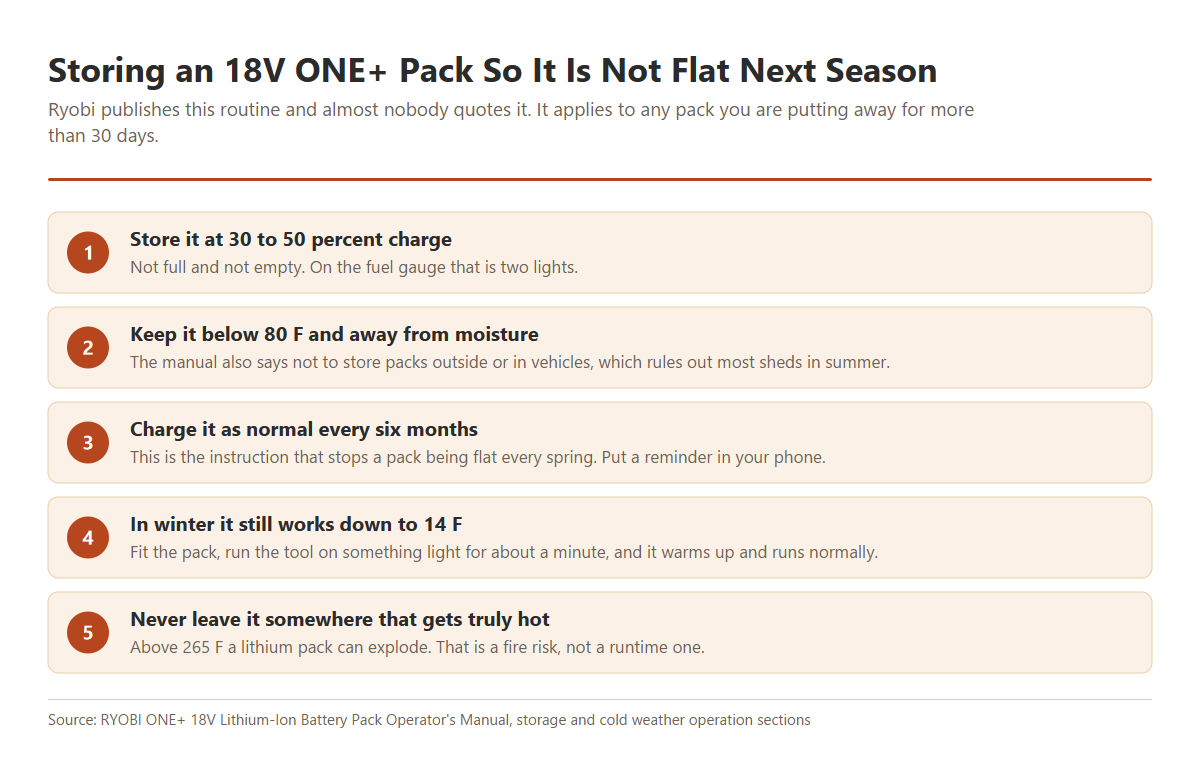
You charged it fully in autumn, you pick it up in spring, and it is dead. Nothing failed here. You’ve got a storage problem, and Ryobi publishes the routine that prevents it.
Most people store packs either completely full or completely empty, and both are hard on lithium cells over months.
How To Fix It
- Charge or run the pack to 30 to 50% before it goes away. On the gauge that is two lights.
- Store it below 80F and away from moisture. Not outside, and not in a vehicle.
- Charge it as normal every six months. This single habit is what stops the spring surprise.
- Take packs off the charger once they are full rather than leaving them there for months.
That six-month instruction is in Ryobi’s own manual and almost nobody quotes it. If you only change one thing after reading this page, make it that one.
One warning that belongs here rather than in a footnote. A lithium pack exposed to temperatures above 265F can explode. A closed car in summer won’t reach that, but a shed fire or a workshop heater can, so treat storage temperature as a safety matter and not just a runtime one.
7. The Charger Shows No Lights at All
Most no-light complaints turn out to be a dead outlet or a switched-off power board, so check that first. Plug something else into the same socket and confirm you have power.
If the charger has power and still shows nothing, Ryobi’s manual carries a specific instruction, and it is more serious than the others on this page.
Safety warning. If at any point during charging none of the LEDs are lit, remove the battery pack from the charger straight away to avoid damaging the product. Do not insert another battery. Ryobi’s instruction is to return both the charger and the battery to a service center for a check or replacement.
That last part matters. Your instinct will be to try a second pack to see whether the charger is dead, and this is the one situation where Ryobi tells you not to. Testing with another battery risks damaging that one too.
How To Fix It
- Confirm the outlet works with another appliance.
- Check the charger cord for damage along its whole length and at the plug.
- If the cord is damaged, stop. Ryobi says a damaged cord or plug must be replaced by an authorized service technician, not taped up.
- If power is fine and the charger is still dark, remove the pack and set both aside.
- Call Ryobi on 1-800-525-2579 or replace the charger.
Chargers are the cheaper half of the pair, and a faulty one can damage good packs. If yours is out of warranty, replacing it is usually your best move.
Charger dead, batteries fine?
The PCG004 is the current fast charger for the ONE+ line, and it fits every 18V ONE+ pack you own. The older P117 is discontinued.
8. The Pack Is Simply Worn Out
If the pack charges to four lights, reads normal voltage at rest, collapses under load, and a second pack works fine in the same tool, you have a worn battery. Lithium cells wear out and there’s no way to bring them back.
Be careful with the numbers you will find quoted for this. Ryobi publishes no charge-cycle rating for its 18V ONE+ packs. Every 18V manual says only that the batteries will eventually wear out.
The widely quoted figure of 300 to 500 charge cycles comes from Battery University, which states it for consumer lithium-ion generally rather than for Ryobi. It’s an industry estimate, and Battery University itself points out that there’s no standard definition of what counts as a cycle.
It also isn’t one trip to the charger. A cycle is a full battery’s worth of use however you get there, so two half-flat runs count as one cycle rather than two.
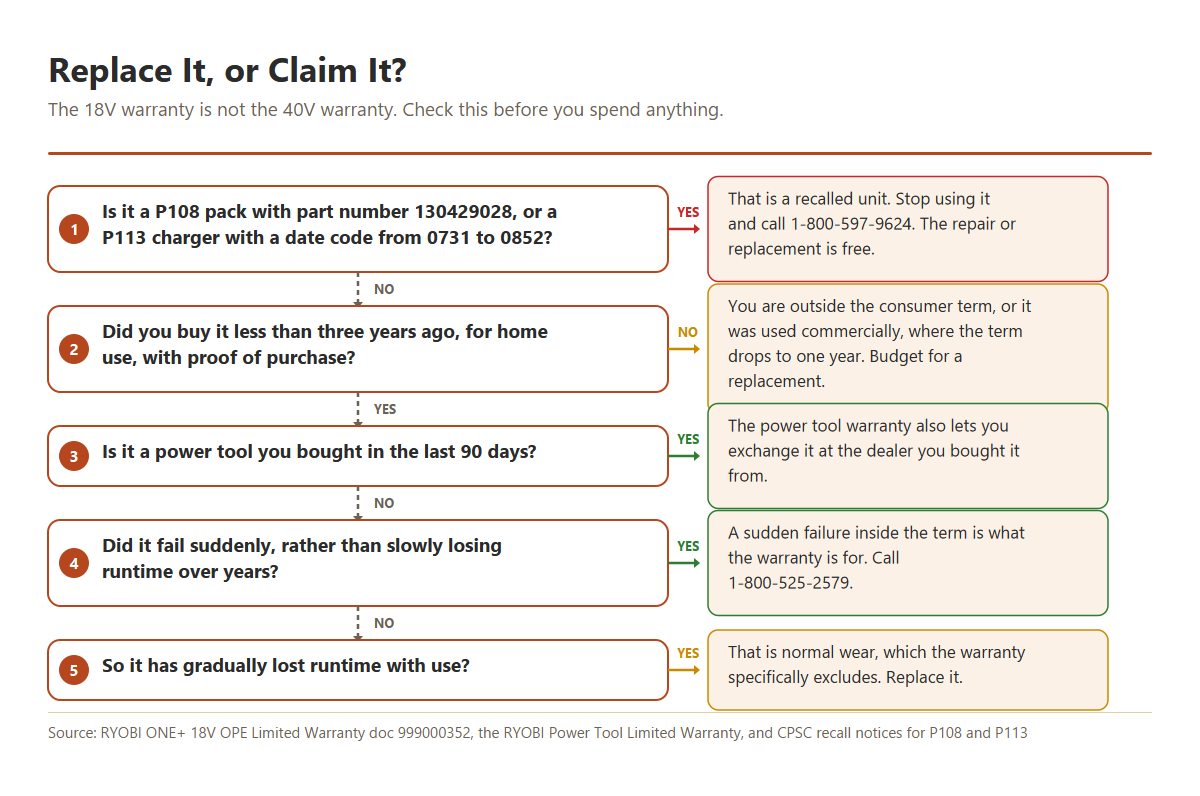
The number that Ryobi does commit to is the warranty, which is why that is the right place to start rather than a cycle count.
How To Fix It
- Find your purchase date. Warranty claims need proof of purchase.
- If it is under three years old and was used around the home, call Ryobi on 1-800-525-2579.
- Be honest about how it failed. A sudden failure is a defect claim, and gradual runtime loss is normal wear, which the warranty excludes.
- If it is out of warranty, recycle the old pack rather than binning it. Home Depot takes rechargeable batteries in store.
Price a genuine ONE+ replacement pack
Model-Specific Notes
Current packs. PBP002 (1.5Ah), PBP003 and PBP006 (2Ah), PBP004 and PBP005 (4Ah), PBP007 (6Ah), PBP1008 (8Ah), PBP1012 (12Ah), and the EDGE packs PBP1104, PBP1108 and PBP1112. All of them share the fuel gauge and protection behavior described above.
Older packs you probably still own. P102, P104, P107, P108, P189, P190, P191 and P197. They still work in current ONE+ tools, and the ONE+ promise is that every 18V pack you own fits every 18V tool you own.
Chargers. The P117 is the dual chemistry unit most people have, and it’s now discontinued. Current replacements are the PCG002 and the faster PCG004. There are also multi-port units in the PCG005, PCG006 and PCG008 range.
If you own both platforms, Ryobi makes the P137, also sold as the PCG007, which is a dual platform charger for 18V ONE+ and 40V packs. It is the only sanctioned way to run one charger across both systems.
A note on the words “dual chemistry”
The P117 is sold as the “18V ONE+ Dual Chemistry Charger”, and third-party listings for it routinely advertise NiCd and NiMH support. Ryobi’s current manual for that charger doesn’t make that claim.
The manual states in three separate places that you should charge only lithium-ion rechargeable batteries on it, and its stated application is charging ONE+ 18V lithium-ion packs. Other battery types, it warns, may burst.
We’re reporting that as we found it rather than resolving it. If you’ve got old NiCd blue packs, check the compatibility documentation that came with your own charger rather than trusting a marketplace listing.
Two recalls worth checking
P108 battery packs. A run of Lithium 18V 4Ah packs was recalled because they could overheat and burst while on the charger. Affected packs are model P108 with part number 130429028, sold between September and December 2012. The part number is on the data plate on the bottom of the pack. Stop using it and call One World Technologies on 1-800-597-9624 for a free repair.
P113 dual chemistry chargers. Chargers with manufacturing date codes between 0731 and 0852 and no nine-digit part number were recalled for a fire and burn hazard. They were sold between September 2007 and December 2009, and the replacement is free on the same number.
Neither recall covers every unit of those models, so check the numbers on your own hardware before you assume anything either way. If yours isn’t in the affected run, you’re fine.
Buying a Replacement 18V ONE+ Battery
Aftermarket 18V packs are everywhere and they’re cheap, which is exactly why they’re worth thinking about carefully. Cell quality varies enormously between sellers, the protection electronics are the part being cut to hit the price, and a pack that fails inside your tool is a fire risk rather than an inconvenience.
Genuine Ryobi packs cost more and carry the three-year warranty. On a platform where you probably own six tools that all depend on the same battery, that’s usually the better trade.
Capacity is your other decision, and it matters more than people expect. A 1.5Ah or 2Ah pack keeps a drill light and comfortable. A 4Ah or 6Ah pack delivers more current, so it trips the protection circuit far less in hungry tools like saws, blowers and mowers.
If your tool has been cutting out under load, moving up in capacity often solves it outright.
Ready to replace the pack?
A genuine 4Ah ONE+ battery is the sensible middle ground. It fits every 18V ONE+ tool and carries Ryobi’s three-year warranty.
If the charger turned out to be the failure, the PCG004 fast charger is the current model and charges faster than the P117 it replaces. If you would rather stay with the unit you know, genuine P117 chargers are still sold, though usually in two-packs now that the model is discontinued.
Whichever you choose, buy the charger before you buy a third battery. A faulty charger will happily damage every new pack you feed it.
Related Ryobi Guides
- Ryobi 40V battery not charging: the hub guide, covering a pack the charger will not accept at all, including sleep-mode recovery.
- Ryobi 40V charger problems: six causes covering no lights, lights that never progress, dirty contacts and a charger that says full when it is not.
- Ryobi battery flashing red and green: what the error code means, and the two-minute test that shows whether the pack or the charger failed.
- Ryobi 40V battery won’t hold a charge: a pack that charges to four lights then dies in minutes: worn cells, early cutouts, voltage sag and self-discharge in storage.
- Ryobi 18V string trimmer troubleshooting: the mechanical faults on the 18V trimmer itself: line, spool, guard and the head that will not feed.
- Ryobi 40V lawn mower won’t start: the five start interlocks that stop a mower dead even with a fully charged pack, plus the test that separates a battery fault from a mower fault.
Frequently Asked Questions
Why does my Ryobi 18V battery cut out while the tool is still running?
That’s your pack’s protection circuit tripping, and it’s normal. Release the trigger and squeeze it again, which resets it and lets you carry on.
If it keeps happening on the same tool, you’re drawing more current than that pack can supply. A higher capacity battery usually fixes it for good.
My battery shows a full charge but the tool will not run. What now?
Clean both sets of contacts first, then try the pack in a different 18V tool. If it runs in the second tool, the fault is in the first tool rather than the battery.
If it fails in both, put a multimeter across it and watch the voltage while someone pulls the trigger. A pack that reads fine at rest and collapses under load has worn cells.
What does a flashing red light mean on a Ryobi 18V charger?
It means your charger is evaluating a low battery, not that your battery is defective. The charger conditions the pack until it reaches normal voltage, then starts charging by itself.
The fault light is a red light that fades in and out rather than flashing. If you see that, work through the two-battery test in section 2.
How long do Ryobi 18V ONE+ batteries last?
Ryobi does not publish a cycle-life rating for them, so anyone quoting a specific number for Ryobi isn’t quoting Ryobi. The only commitment the company makes is the warranty, which is three years for household use.
In practice, your storage habits matter more than age. A pack kept at 30 to 50% charge and topped up every six months will outlast one left flat in a cold shed all winter.
Can I leave a Ryobi 18V battery on the charger?
Your charger is designed for it. Once charging finishes, it holds a maintenance mode and then drops into an energy save mode, waking periodically to keep the pack topped up.
Ryobi still advises removing the pack once it’s fully charged, and unplugging the charger when it isn’t in use. For long-term storage, take the pack off and store it part-charged instead.
Are Ryobi 18V ONE+ batteries interchangeable with 40V?
No. The two platforms have different physical connections, so your 18V pack won’t fit a 40V tool and a 40V pack won’t fit your 18V tool.
Within the ONE+ line, any 18V ONE+ battery fits any 18V ONE+ tool. If you own both systems, the P137 dual platform charger handles 18V and 40V packs in one unit.
Is my Ryobi 18V battery under warranty, and how do I claim it?
For outdoor tools, the ONE+ 18V warranty is three years on the tool, the battery and the charger for household use, dropping to one year if the gear is used commercially. Ryobi power tools carry a separate three-year warranty, and batteries are covered for three years under that too.
Call 1-800-525-2579 with your proof of purchase. Note that the warranty covers defects and specifically excludes normal wear, so a pack that slowly lost runtime over several years isn’t likely to qualify.
One extra option people miss: Ryobi power tools bought within the last 90 days can be exchanged at the dealer you bought them from rather than going through a service center.
Was my Ryobi 18V battery or charger ever recalled?
Two 18V products were. P108 packs with part number 130429028, sold between September and December 2012, were recalled because they could overheat and burst on the charger.
P113 dual chemistry chargers with date codes between 0731 and 0852 and no nine-digit part number were also recalled, for a fire hazard. Both remedies are free on 1-800-597-9624.
Still Stuck?
If your pack charges but dies quickly, the pattern is worth comparing against our guide to a battery that will not hold a charge, since the diagnosis is similar even though that page covers the 40V line.
If the trouble is really with the tool rather than the battery, our Ryobi 18V string trimmer troubleshooting guide covers the mechanical faults that get blamed on batteries. For background on how lithium and NiCd packs differ, see our cordless tool battery guide.
Comments are open below if your symptom isn’t covered here. Reader questions are where most of these guides come from.
Sources: RYOBI ONE+ 18V Lithium-Ion Battery Pack Operator’s Manual (PBP series), RYOBI P117 Operator’s Manual document 988000-503 rev 12, the RYOBI ONE+ 18V OPE Limited Warranty document 999000352, the RYOBI Power Tool Limited Warranty, and CPSC recall notices for the P108 and P113. Charge-cycle figures are attributed to Battery University and are not a Ryobi specification.
We may be paid a commission if you purchase through links on this page, at no extra cost to you.
