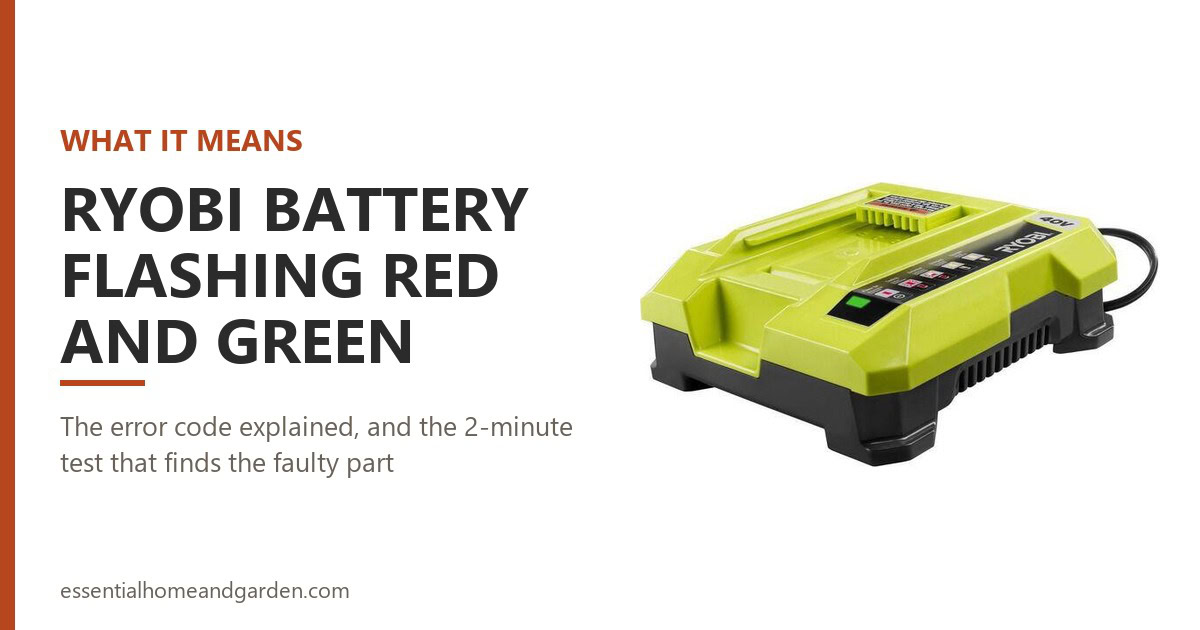
Your Ryobi charger is flashing red and green at the same time, and you want to know whether that means your battery is dead, your charger is dead, or neither. Ryobi’s manual gives a short answer: red and green flashing together is the error state, and it means the fault is in the pack or the charger, without saying which.
The good news is that a two-minute test tells you which one. Before that, there are a handful of cheap checks that clear the fault entirely for a lot of people.
This guide covers the OP400, OP401, OP403, OP404 and OP406/OP406A chargers, and the OP4015, OP4026, OP4030, OP4050 and OP40752 packs. Every light code below comes from Ryobi’s own operator manuals.
This post contains affiliate links. We may be paid a commission if you purchase through links, at no extra cost to you.
The Important Stuff
- Red and green flashing at the same time is the only error state on a Ryobi 40V charger. Red on its own, or green on its own, means something else entirely.
- If it flashes red and green with no battery inserted, there’s no pack to blame. The charger has failed.
- The rapid charger and the standard charger use different codes. A temperature hold on an OP406 looks like both LEDs steady, which people regularly mistake for a fault.
- Put a second, known-good pack on the same charger. That single test tells you which part failed.
- Do not keep cycling the pack on and off the charger. Several readers have reported ending up with a charger that flashes red and green with nothing attached at all.
6 Reasons Your Ryobi Battery Is Flashing Red and Green & How to Fix It
Find your situation, then read on for the detail.
| Why it’s flashing red and green | What to do |
|---|---|
| 1. It flashes with no battery inserted | The charger itself has failed. No pack is involved, so no pack can be at fault. |
| 2. The battery pack has failed | Confirm with a second pack, then recycle the dead one. The most common outcome. |
| 3. Dirty contacts or a pack that won’t seat | Unplug, clean the port and terminals, reseat until the latches snap. The cheapest fix. |
| 4. The pack is too hot or too cold | Bring it to room temperature. On some chargers this looks like a fault but isn’t one. |
| 5. The pack is too deeply discharged | Use a standard charger, which documents a conditioning mode. Give it hours. |
| 6. It starts flashing after a full charge | The pack has hit a protection fault at the end of the cycle. Test it under load. |
What Red and Green Flashing Actually Means
First, a small correction that matters. The lights you’re watching are on the charger, not the battery. The battery’s own fuel gauge is the row of green LEDs you see when you press the button on the pack.
Ryobi’s OP406 manual labels the simultaneous red and green flash “Battery pack or charger error.” The OP401 manual calls the same pattern “Battery pack or charger is defective.”
Notice what neither manual tells you. Neither one tells you the battery is dead. Both tell you the fault sits in one of two components and leave you to work out which.
Before you go further, check which charger you own, because the two use different codes for the same condition.
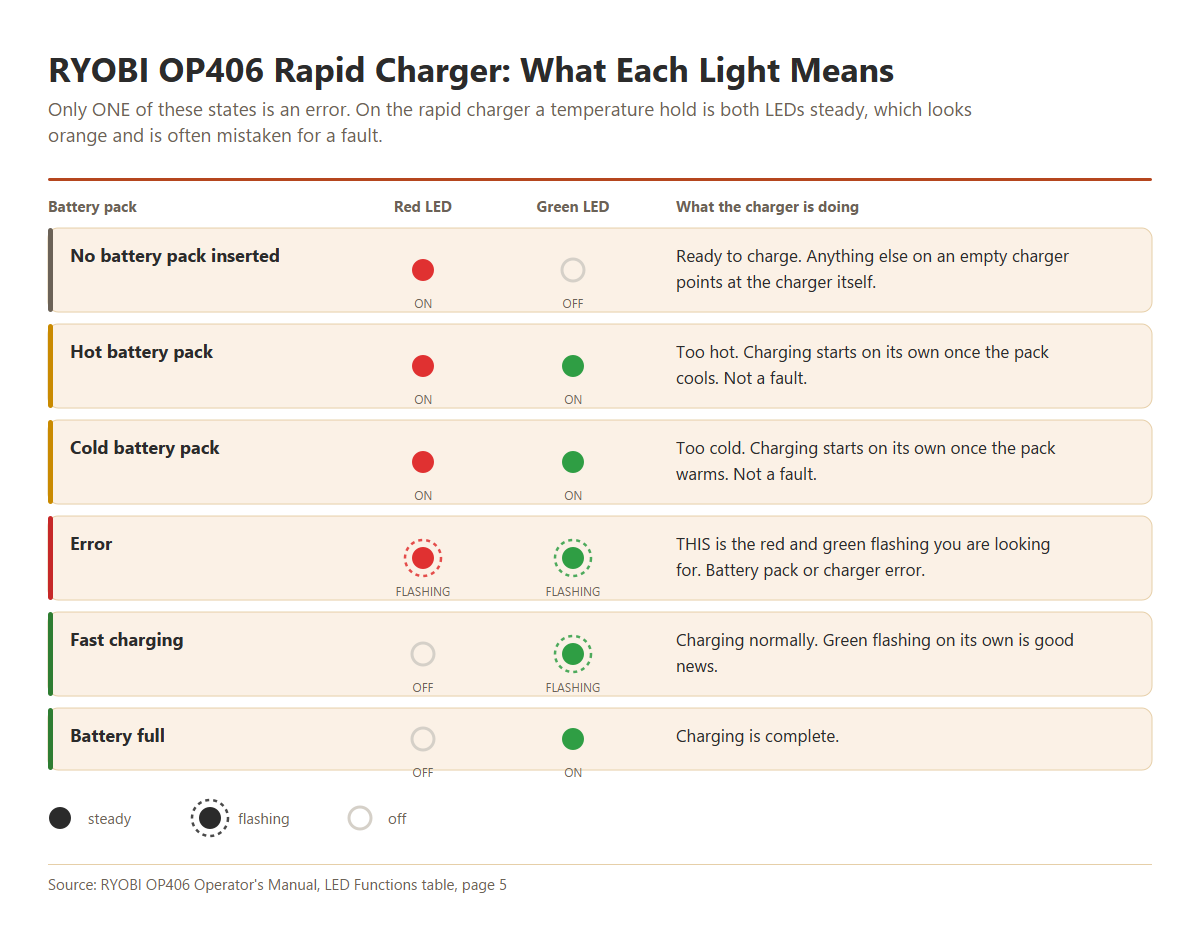
On the rapid charger, a pack that’s too hot or too cold shows both LEDs on steady. That looks orange at a glance and gets misread as a fault constantly.
It is not one. The charger is simply waiting for your pack to reach a safe temperature.
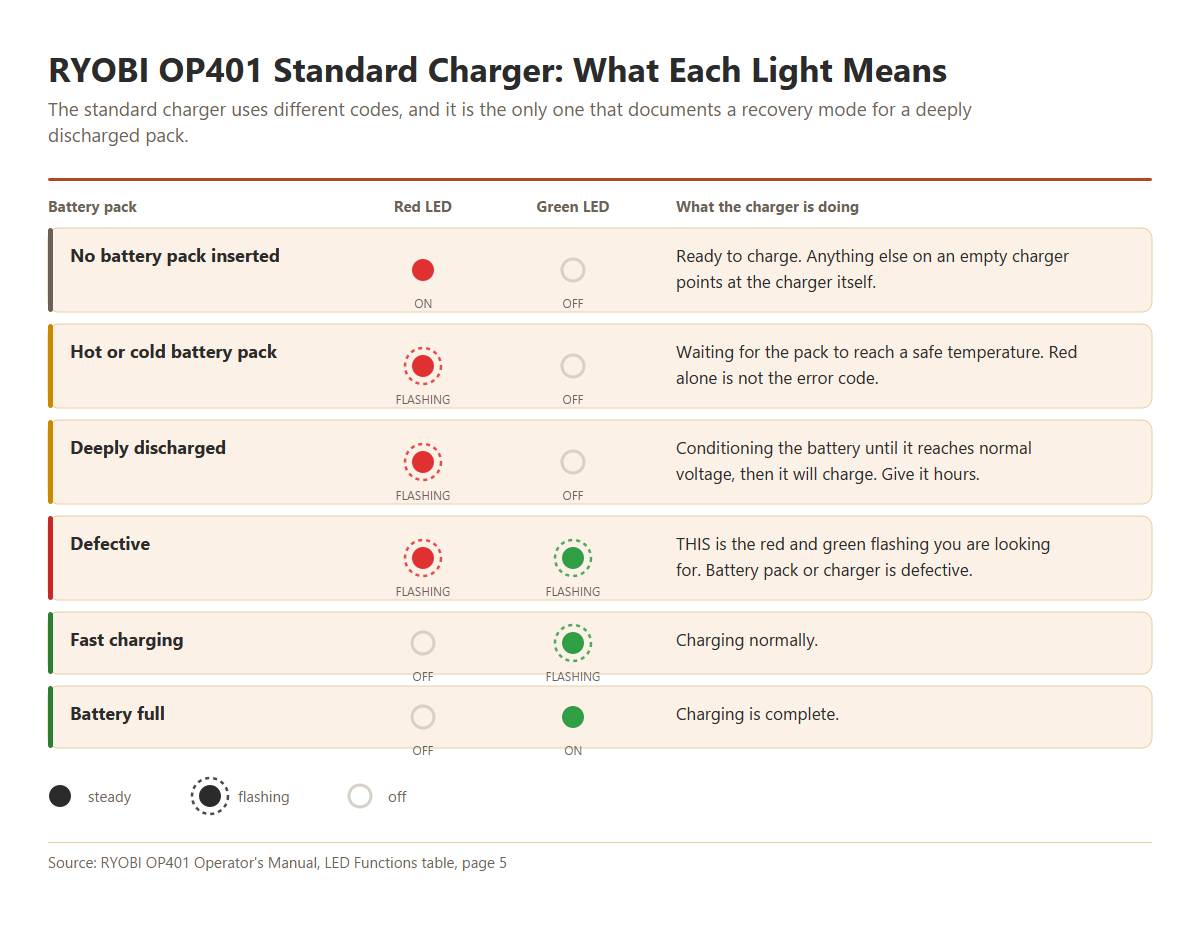
On the standard charger, a temperature hold is red flashing with green off, and there’s an extra state the rapid charger doesn’t have: a conditioning mode for a deeply discharged pack.
So if you are seeing red flashing on its own, that is not your error code. Only red and green together is.
If your charger is doing something else entirely, like showing no lights at all or sitting on one color and never starting, our guide to Ryobi 40V charger problems walks through the other five symptoms.
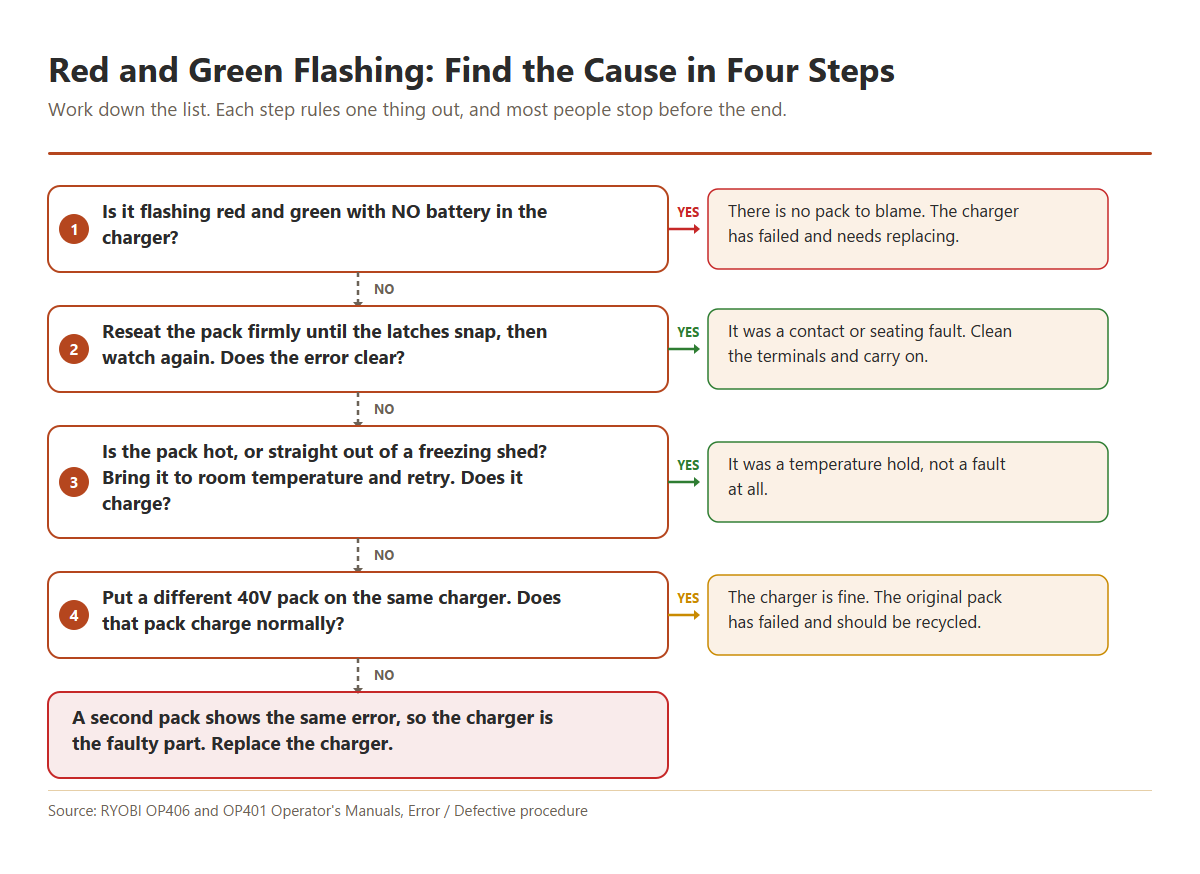
Here’s the fastest route from symptom to answer.
1. It Flashes With No Battery in the Charger
This comes up more than any other version of the question, and it has a clean answer.
Plug the charger in with nothing on it and watch. Every Ryobi 40V charger manual specifies the same thing for an empty charger: red on, green off, meaning ready to charge.
If yours flashes red and green while empty, there’s no battery present to be defective. The fault has to be in the charger.
How To Fix It
There is no repair path for this one. Ryobi’s own instruction, once a fault repeats with a different battery, is that the charger should be replaced.
- Unplug it, leave it for a minute, and plug it back in to rule out a one-off.
- Try a different wall outlet, straight into the wall rather than through an extension cord.
- If it still flashes red and green empty, replace it.
Do not open it looking for a fix. Ryobi warns there are no user-serviceable parts inside and that incorrect reassembly creates a shock and fire risk.
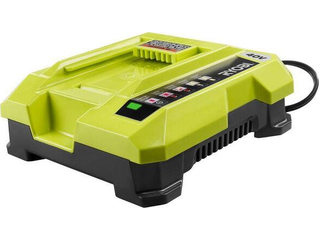
Flashing with an empty charger?
That’s the clearest diagnosis on this page. No pack is involved, so nothing else can be causing it.
2. The Battery Pack Has Failed
If the charger behaves normally when empty, the pack is the more likely culprit. Lithium cells degrade, and a pack that is several years old and heavily used eventually reaches a state the charger refuses to work with.
How To Fix It
Confirm it before you spend anything. Ryobi publishes the procedure.
- Take the pack off, put it back on, and watch the lights a second time.
- If the error repeats, put a different 40V pack on the same charger.
- If that second pack charges normally, your first pack is the failed part.
- If the second pack throws the same error, the charger is the failed part instead.
That’s the whole diagnosis, and it costs nothing.
An OP4026 is the pack that turns up most often in reader reports. It shipped with a huge number of trimmers and blowers over a decade ago, and those cells are well past their design life now. If yours is that old and a second pack charges fine, you have your answer.
When it comes to replacing it, a genuine RYOBI 40V 6.0Ah pack is the straightforward swap and works with every 40V tool you already own. Higher capacity buys you longer runtime rather than more power.
Recycle a failed pack rather than keeping it around. Home Depot and Lowe’s both run collection bins, and Call2Recycle lists drop-off sites.
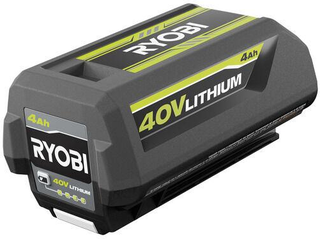
Second pack charged fine?
Then the first one has failed, and no amount of cleaning or waiting will bring the cells back. Recycle it and replace it.
3. Dirty Contacts or a Pack That Won’t Seat
A pack that can’t make solid electrical contact reports as defective even when it’s perfectly healthy. This is the cheapest thing on your list, and worth doing before you condemn anything.
You’ll see the charger behaving inconsistently. It reads the pack sometimes and not others, or the lights change when you press down on the battery.
How To Fix It
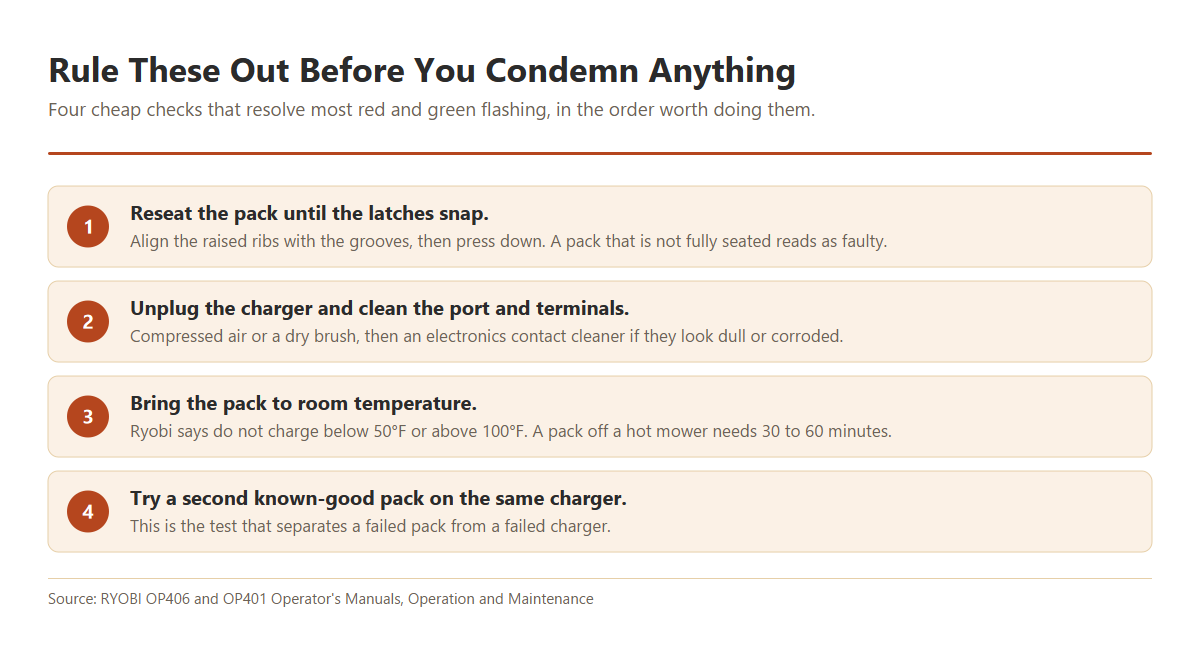
What you need: an electronics-safe contact cleaner that dries without residue, such as CRC QD Contact Cleaner. Water, WD-40 and general degreasers all belong nowhere near battery terminals.
If your pack will not latch properly in the tool either, the latch tabs on the housing are worn or cracked. That is a mechanical failure rather than a charging fault, and it means a replacement pack.
4. The Pack Is Too Hot or Too Cold
This one is misread more than any other state, and the reason is that the codes differ depending on which charger you own.
On an OP406 rapid charger, a temperature hold shows both LEDs on steady, which looks amber. On an OP400 or OP401, it shows red flashing with green off. Neither is the error pattern, and neither means anything of yours is broken.
How To Fix It
- Take the pack off the charger and bring it indoors.
- Give a hot pack 30 to 60 minutes. One that just came off a mower on a summer afternoon holds heat longer than you’d expect.
- Put it back on and watch for green flashing, which means it’s charging.
Ryobi says not to use, store or charge a pack below 50°F or above 100°F. The charger’s own resume points are wider, restarting a hot pack once it cools to roughly 120°F (40°C) and a cold one once it warms to about 32°F (0°C).
If a genuine red and green flash persists at room temperature, temperature was never your problem. Go back to the two-pack test.
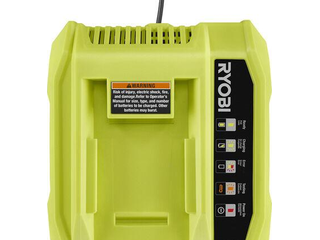
Second pack throws the same error?
Then the pack was never the problem. A charger that faults on two known-good batteries is finished.
5. The Pack Is Too Deeply Discharged
A pack that sat through a cold winter can self-discharge below the voltage a charger will accept. Plenty of readers describe exactly this: your mower went away working in autumn, and the pack flashes red and green in spring.
How To Fix It
Use a standard charger for this, not the rapid one. The difference is real, and it is in Ryobi’s documentation.
The OP401 manual lists a deeply discharged state where the charger “conditions battery until normal voltage is reached, then begins charge mode.” The OP406 rapid charger has no equivalent state in its chart.
- Put the pack on an OP400, OP401 or OP404 standard charger if you have access to one.
- Leave it there. Conditioning is deliberately slow, so give it a few hours before deciding.
- Green flashing means your pack is charging normally again.
If you only own the rapid charger, this is the one situation where the slower standard 40V charger can recover a pack that the rapid one simply rejects. Worth having on the shelf if you store batteries over winter.
Essential Safety Warning: reviving a flat pack
There are methods circulating for waking a dead pack by jumping it from a healthy battery or feeding it from a bench power supply. Our Ryobi 40V battery guide walks through them in detail.
None appear in any Ryobi manual, and all of them push current into a lithium pack while bypassing the protection circuit that exists to stop precisely that. Cells that have sat below their minimum voltage can develop internal shorts, and thermal runaway can begin hours later.
Stop and recycle the pack immediately if you notice swelling, hissing, a chemical smell or unusual heat.
Without eye protection, gloves, a ventilated space and a Class ABC or D extinguisher to hand, buy a replacement instead. Never use water on a lithium fire.
6. It Starts Flashing After a Full Charge
A less common but genuinely confusing version: the pack charges all the way, the charger goes to steady green, and then it drops into red and green flashing.
What that usually points to is your pack reaching a protection fault at the top of its charge rather than a charger fault. A cell that can no longer hold the full voltage will trip protection right at the end of the cycle.
How To Fix It
- Take the pack off once it reads full and try it in a tool straight away.
- If the tool runs for a few seconds then cuts out, the pack is failing under load.
- Try that pack on a second charger. If it does the same thing, the pack is the problem.
- If it happens with every pack you own on one charger, replace the charger.
A pack that reads full and dies under load has failed cells, whatever the fuel gauge shows. Our Ryobi 40V battery guide covers that failure mode in more depth.
If the pack charges normally but the runtime has collapsed, that is capacity loss rather than a flash code, and we cover it separately in why a Ryobi 40V battery won’t hold a charge.
If that is where you have landed, a genuine RYOBI 40V pack is the fix. Third-party cells are where most of the fake-capacity complaints come from, so this is not the place to save twenty dollars.
What Not to Do
This section exists because of what readers have told us, and the first item is the one that matters most.
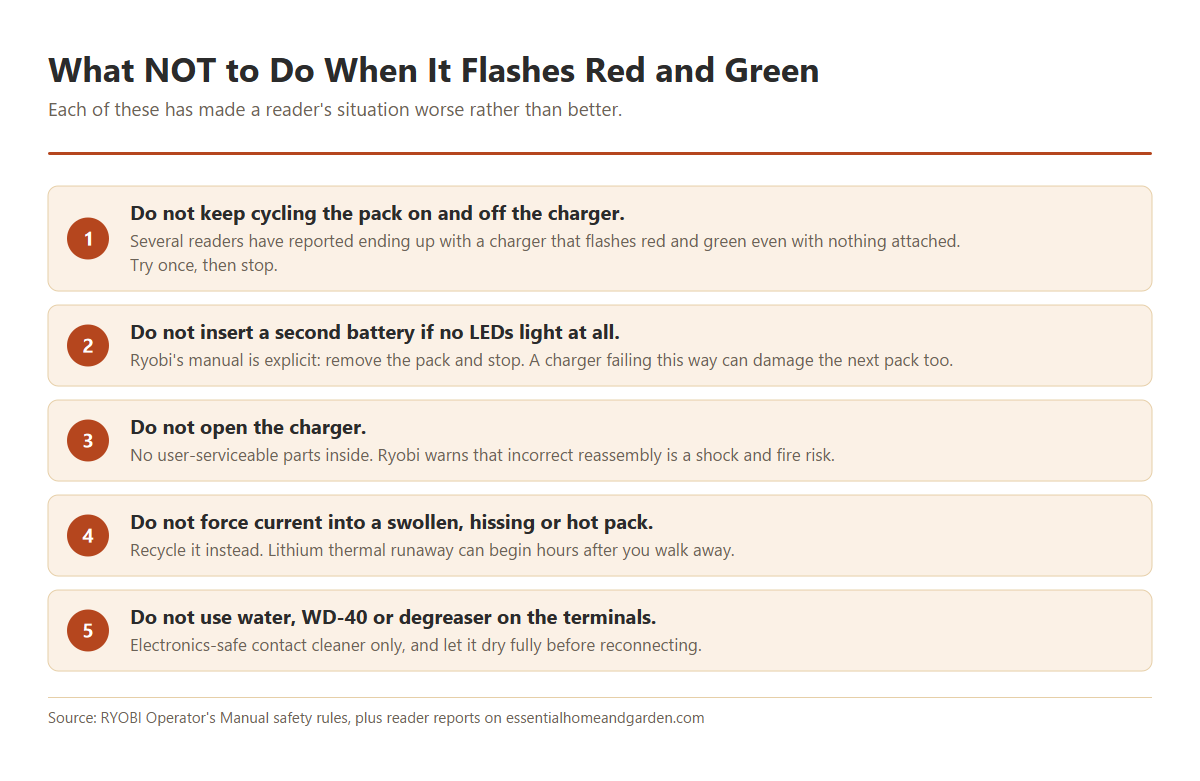
On that first point, several readers have written in describing the same sequence: they kept taking the pack on and off the charger trying to force a charge, and afterwards their charger flashed red and green even with nothing attached.
We cannot say for certain that the repeated cycling caused it, and it would be wrong to claim a mechanism we can’t demonstrate. But the pattern has come up enough times to be worth a warning.
So cap it. Try the reseat once, and if the error comes straight back, move to the two-pack test instead of cycling again.
That test costs you two minutes and tells you more than an hour of retries will.
Model-Specific Notes
Chargers
| Model | Type | Temperature hold looks like | Conditions a flat pack? |
|---|---|---|---|
| OP400 | Standard (discontinued) | Red flashing, green off | Not documented |
| OP401 | Standard | Red flashing, green off | Yes |
| OP403 | Standard with USB | Red flashing, green off | Not documented |
| OP404 | Slim-line compact | Red flashing, green off | Not documented |
| OP406 / OP406A | Rapid | Both LEDs on steady | No such state |
Every one of them uses red flashing plus green flashing for the error, and green steady for complete.
If yours says 36V rather than 40V
Ryobi’s 40V outdoor range is sold as 36V in parts of Europe and elsewhere. It is the same platform with different market naming, and the light codes work the same way.
Model numbers differ though, so check the code chart printed on your own charger before assuming it matches the tables above.
If your part number starts with P
P104 and P117 aren’t 40V parts. They belong to Ryobi’s 18V ONE+ system, where P104 is a battery and P117 is a dual-chemistry charger.
The platforms are not interchangeable, and none of the codes here apply to them.
Buying a Replacement
You’ve run the two-pack test, so you know which part to replace. Check the warranty before you spend anything.
Ryobi 40V chargers and batteries both carry a three-year limited warranty, which is longer than most people assume. You will need proof of purchase with a date, and registering at register.ryobitools.com puts that on file for you. Ryobi’s support line is 1-800-860-4050.
The warranty covers defects rather than wear, so a four-year-old pack that no longer holds a charge is not a claim.
Which charger to buy
The OP406A rapid charger suits you if you run a mower or work through several packs at a time.
The standard 40V charger is slower, but it’s the one that documents a conditioning mode for deeply discharged packs. If you store batteries over winter, that alone makes it the better buy.
Buy the genuine unit. Third-party chargers look tempting on price, and your charger’s whole job is deciding when to stop pushing current into a lithium pack and when to refuse one that’s too hot. An uncertified charger that gets that wrong is a fire risk, and using one can cost you the warranty cover on your battery.
If the pack was the failed part, a genuine RYOBI 40V 6.0Ah pack is the direct swap. Higher capacity gives you longer runtime rather than more power.
Know which part failed?
Replace the one the test pointed at, buy genuine, and you won’t be back here next season.
Related Ryobi Guides
- Ryobi 40V battery not charging: the hub guide, covering a pack the charger will not accept at all, including sleep-mode recovery.
- Ryobi 40V charger problems: six causes covering no lights, lights that never progress, dirty contacts and a charger that says full when it is not.
- Ryobi 40V battery won’t hold a charge: a pack that charges to four lights then dies in minutes: worn cells, early cutouts, voltage sag and self-discharge in storage.
- Ryobi 18V ONE+ battery problems: the other platform: what the three charger lights mean, why flashing red is not a fault, and the protection circuit that stops your tool.
- Ryobi 40V lawn mower won’t start: the five start interlocks that stop a mower dead even with a fully charged pack, plus the test that separates a battery fault from a mower fault.
Frequently Asked Questions
Should the lights flash red and green with no battery in it?
No. With nothing inserted, every Ryobi 40V charger should show red on and green off, meaning ready to charge.
Flashing red and green on an empty charger is an error with no battery present to cause it, so the charger is at fault.
What does red and green flashing actually mean?
It is Ryobi’s error state, described in your manual as “battery pack or charger error” on the OP406 and “battery pack or charger is defective” on the OP401.
It deliberately does not tell you which of your two parts failed. The two-pack test is how you find out.
My charger flashes red and green after the battery is fully charged
That points at the pack rather than the charger. A cell that can’t hold full voltage will trip a protection fault right at the top of the charge cycle.
Take the pack off at that point and try it in a tool. If it cuts out under load, the pack is on its way out.
Is it the battery or the charger?
Put a second, known-good 40V pack on the same charger. If it charges normally, the charger is fine and your first pack has failed.
If the second pack throws the same error, replace the charger. That’s Ryobi’s published procedure, not a workaround.
My OP4026 is out of warranty and flashing red and green. Anything left to try?
Try the conditioning route on a standard charger, and make sure the contacts are clean and the pack is at room temperature.
If a different pack charges fine on that same charger, the OP4026 has reached the end of its life. Cell degradation isn’t repairable, and these packs are well over a decade old now.
The battery shows four lights but the charger still flashes red and green
Your fuel gauge reads voltage, not health. A worn pack can show a full four lights and still fail the charger’s own check.
Trust the charger over the gauge here, and confirm with a second pack.
What do four lights flashing twice mean?
The pack is reporting a protection fault. Ryobi documents that a battery flashes an error code for at least five seconds and lists out-of-range temperature, over-current and permanent failure as the conditions.
Ryobi doesn’t publish a lookup table matching a number of flashes to a specific fault, so anyone telling you two flashes means one exact thing is guessing. Let the pack reach room temperature and try again.
The charger flashes green several times, then red and green. What is that?
The green flashes at the start are the charger testing the pack. Landing on red and green afterwards means it ran that check and rejected the pack.
Treat it as the standard error state and run the two-pack test.
I left the battery on the charger all winter. Did that cause it?
Ryobi’s guidance is to disconnect the charger from the power supply when it isn’t in use, and to store packs below 80°F and away from anywhere under 50°F or over 100°F.
An unheated shed sits outside that range for months at a time, which is a common reason a pack that went away healthy comes back deeply discharged.
Can I fix it by resetting the board or shorting the reset pads?
That is an internal repair, it is not documented by Ryobi anywhere, and readers who’ve tried it report mixed results at best. One described shorting the pads, seeing all four LEDs flash, and getting the same red and green error the moment the pack went back on the charger.
Opening a lithium pack carries a genuine fire risk. If the two-pack test says the pack has failed, replacing it is the sensible call.
How long should I leave it on the charger before giving up?
If yours is throwing red and green flashing, more time will not help. That is an error state rather than a slow charge.
The exception is a deeply discharged pack on a standard charger, where conditioning is meant to take hours. That shows as red flashing with green off, not red and green together.
The Test Worth Remembering
Red and green flashing tells you something failed. It does not tell you what. A second battery on the same charger answers that in about two minutes, and it’s the step most people skip.
Comments are open below if your symptom is not covered here. Reader questions are where most of these guides come from.
Sources: RYOBI OP406 and OP401 operator’s manuals (TTI Group North America), and the RYOBI 40V lithium-ion battery pack operator’s manual.
We may be paid a commission if you purchase through links on this page, at no extra cost to you.
